

A website can look impressive and still frustrate visitors. A large banner may take several seconds to appear, a menu might hesitate after someone clicks it, or a button may suddenly move just as a customer tries to select it.
These problems affect how people experience your website, even when the design itself looks professional.
Google’s Core Web Vitals provide a way to measure these experiences. Instead of focusing only on how quickly a page finishes loading, they examine when important content becomes visible, how promptly the website responds, and whether the layout stays stable.
For businesses, these measurements offer a practical starting point for improving website performance, usability, and technical SEO.
What Are Core Web Vitals and Why Do They Matter?
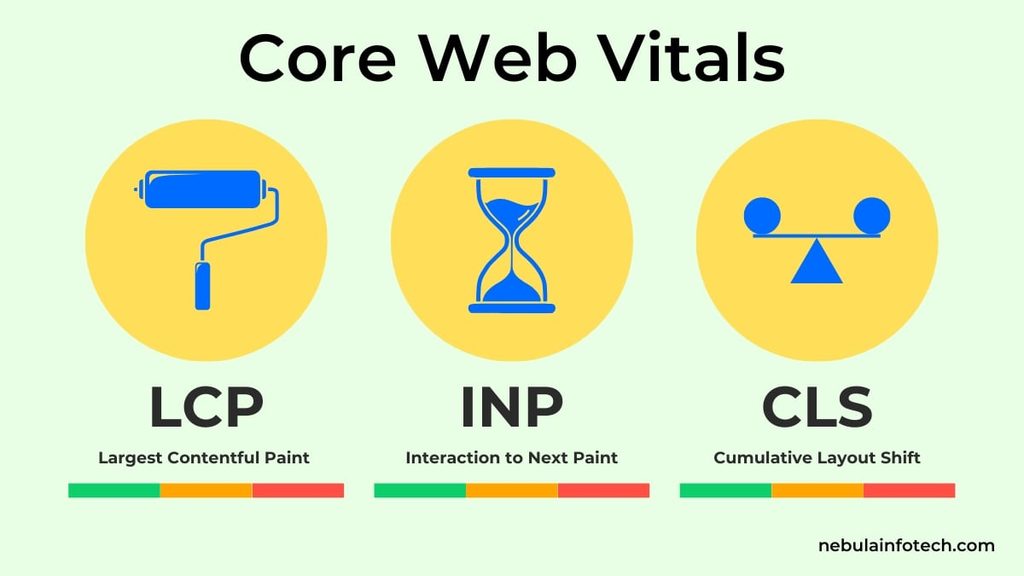
Core Web Vitals are three performance metrics introduced by Google to measure loading speed, interaction responsiveness, and visual stability. The metrics are Largest Contentful Paint (LCP), Interaction to Next Paint (INP), and Cumulative Layout Shift (CLS).
Each metric evaluates a different part of the browsing experience. LCP focuses on when the main content appears. INP measures how quickly a page responds to user interactions. CLS identifies unexpected movement of visible elements.
These measurements matter because visitors interact with websites under different conditions. Someone browsing on a mobile connection may experience delays that are not obvious on a powerful desktop computer.
Core Web Vitals also contribute to Google’s ranking systems, although passing them does not guarantee higher rankings. Search relevance, helpful content, and other signals remain important.
For a business website, improving performance is about making the experience more dependable. A responsive, stable page makes it easier for visitors to explore services, read information, complete forms, and contact a business.
What Are the Three Core Web Vitals and Their Recommended Scores?
The three Core Web Vitals are LCP, INP, and CLS, and each has a separate threshold for good performance.
Google recommends evaluating these metrics at the 75th percentile of real-user visits, separately for mobile and desktop. This means performance is assessed across many visits rather than judged by one test.
| Core Web Vital | Good | Needs Improvement | Poor |
|---|---|---|---|
| Largest Contentful Paint (LCP) | 2.5 seconds or less | Above 2.5 to 4 seconds | Above 4 seconds |
| Interaction to Next Paint (INP) | 200 milliseconds or less | Above 200 to 500 milliseconds | Above 500 milliseconds |
| Cumulative Layout Shift (CLS) | 0.1 or less | Above 0.1 to 0.25 | Above 0.25 |
A website needs to meet the recommended threshold for all three metrics to pass the Core Web Vitals assessment.
It is also important to distinguish these results from a Lighthouse performance score. A website may receive a strong laboratory score while real visitors continue experiencing slow interactions or unexpected layout changes.
The goal is not necessarily a perfect score of 100. It is to identify and resolve performance issues that affect actual visitors.
What Is Largest Contentful Paint (LCP) and How Can You Improve It?
Largest Contentful Paint measures how long it takes for the largest eligible visible content element to render after a page begins loading. A good LCP score is 2.5 seconds or less.
On many websites, the LCP element is a hero image, prominent heading, or large content block near the top of the page.
One common problem is delayed resource discovery. For example, a browser may need to download a stylesheet or execute JavaScript before discovering an important image. Even a compressed image can produce poor LCP when it starts loading too late.
Server response time, render-blocking resources, image delivery, and rendering delays can also affect the metric.
For WordPress websites, useful improvements include optimizing the main image, reviewing caching, reducing unnecessary scripts, and ensuring the browser can discover important resources early.
If the hero image is the LCP element, avoid lazy-loading it. Instead, consider appropriate preload or fetch-priority settings after confirming the resource is genuinely important.
For more detailed techniques, read my guide on how image optimization improves website loading speed.
What Causes Poor Interaction to Next Paint (INP)?
Poor INP occurs when a website takes too long to display a visual response after a user interacts with it. Google considers 200 milliseconds or less a good result.
Imagine someone opening a navigation menu on a mobile website. The visitor taps the menu icon, but the interface does not respond immediately. The page may already be loaded, yet the browser is occupied with other work.
INP measures responsiveness across qualifying interactions during a visit. It includes input delay, event processing, and the delay before the browser presents the updated frame.
Large JavaScript tasks are a frequent cause of responsiveness problems. Third-party scripts, complex event handlers, expensive rendering work, and excessive DOM complexity can contribute.
For example, a WordPress website with multiple animation plugins, tracking scripts, and interactive widgets may require more main-thread processing than necessary.
Improving INP involves identifying slow interactions, reducing unnecessary JavaScript execution, breaking up long tasks, and avoiding expensive interface updates.
The most useful approach is to investigate the actual interaction causing the delay instead of removing features without understanding their performance impact.
Why Does Cumulative Layout Shift (CLS) Happen?
Cumulative Layout Shift measures unexpected movement of visible page elements while someone uses a website. A CLS score of 0.1 or less is considered good.
A familiar example occurs when a visitor starts reading an article and an image loads above the paragraph, pushing the text downward. The visitor loses their reading position even though they did not request a layout change.
Missing image dimensions are one possible cause. Advertisements, embedded videos, dynamically inserted banners, and web fonts can also affect layout stability.
Animations may create problems when they change layout-related properties instead of using visual transformations.
A stable website reserves sufficient space for elements before they load. Developers can define image width and height attributes, use CSS aspect ratios, and provide predictable containers for dynamic content.
For WordPress and Elementor websites, pay particular attention to sliders, sticky headers, delayed widgets, and sections that depend on JavaScript to establish their dimensions.
CLS is not simply a visual design issue. Unexpected movement can interfere with navigation, reading, and form completion, making it an important part of website usability.
How Do You Measure Core Web Vitals Accurately?
Core Web Vitals should be measured using real-user performance data and laboratory diagnostics together. Real-user data shows what visitors experience, while laboratory testing helps developers investigate potential causes.
Google provides several tools for this work.
PageSpeed Insights reports available Chrome User Experience Report data and generates Lighthouse diagnostics. It helps identify opportunities involving images, scripts, rendering, and other technical factors.
Google Search Console provides a Core Web Vitals report that groups URLs by performance status. This is useful for identifying problems affecting multiple pages.
Chrome DevTools allows developers to inspect network requests, rendering activity, long tasks, and layout shifts. Its Performance panel is particularly useful when a score does not explain the underlying issue.
The Chrome User Experience Report, commonly called CrUX, collects performance information from eligible Chrome users.
One important limitation is that not every website or individual URL has enough eligible traffic for URL-level field reporting.
A reliable assessment compares mobile and desktop results, checks the available field data, and uses controlled tests to investigate problems before implementing changes.
How Can You Improve Core Web Vitals on WordPress Websites?
Improving Core Web Vitals on WordPress requires identifying the resources, scripts, and layout behaviors responsible for poor performance. Installing a caching plugin alone does not solve every problem.
WordPress performance depends on the hosting environment, theme, page builder, plugins, media files, and custom code.
A website with a lightweight theme can still perform poorly if third-party scripts block interactions. Similarly, an Elementor website may achieve good results when its assets and page structure are managed carefully.
For LCP, review server response time, caching, image loading, and critical resources. For INP, investigate JavaScript execution, unnecessary widgets, and expensive event handlers. For CLS, reserve space for images, embeds, banners, and other dynamic elements.
Avoid enabling every optimization setting simultaneously. Some changes, such as aggressive JavaScript delay or CSS removal, can break menus, forms, animations, and other functionality.
Testing after each meaningful change makes it easier to identify improvements and regressions.
If your website needs technical development work, explore my WordPress development services in Dubai, including performance-focused development and troubleshooting.
Do Core Web Vitals Affect Google Rankings and SEO?
Yes, Google uses Core Web Vitals in its ranking systems, but good performance scores do not guarantee higher search rankings. Core Web Vitals are one part of a broader evaluation of page experience.
A website that loads quickly but provides irrelevant information is unlikely to satisfy a visitor’s search intent. Likewise, a useful article may still benefit from technical improvements that make its content easier to access.
The relationship between performance and SEO should therefore be considered alongside content quality, internal linking, mobile usability, crawlability, and other technical factors.
Core Web Vitals can also reveal issues that affect visitors arriving through organic search. A slow landing page may make important information harder to reach, while delayed interactions can interfere with contact forms and navigation.
Performance improvements may support conversion goals by reducing friction, but the effect should be measured rather than assumed.
For a broader explanation of how website experience supports business outcomes, read my article on website conversion rate optimization.
Treat Core Web Vitals as a practical quality measure, not a shortcut to first-page rankings.
How Do You Perform a Core Web Vitals Audit?
A Core Web Vitals audit identifies failing metrics, investigates their technical causes, and verifies whether targeted fixes improve performance. The process should begin with evidence rather than assumptions.
First, examine the Core Web Vitals report in Google Search Console to understand which page groups need attention. Compare mobile and desktop performance because device conditions can produce different results.
Next, test representative URLs in PageSpeed Insights. Review available field measurements before interpreting the laboratory recommendations.
Use Chrome DevTools to inspect specific issues. For LCP, investigate the main content element and its loading timeline. For INP, reproduce slow interactions and inspect main-thread activity. For CLS, identify the elements responsible for unexpected movement.
Prioritize fixes that address shared problems across multiple pages. A slow global header or common page template may deserve attention before an isolated decorative element.
After implementing changes, repeat the controlled tests and check important functionality.
Finally, monitor field data as new visits are recorded. Improvements may not appear immediately in aggregated reports.
Regular website maintenance services in Dubai can help address performance regressions alongside software updates, technical issues, and functionality checks.
Why Are Core Web Vitals Different in PageSpeed Insights and Search Console?
PageSpeed Insights and Google Search Console can show different Core Web Vitals results because they present data at different levels and for different diagnostic purposes.
PageSpeed Insights may display field data for an individual URL, origin-level information when available, and a laboratory test performed under controlled conditions.
Search Console organizes performance information into groups of similar URLs and reports issues based on CrUX data.
A laboratory test captures a particular loading session. Real-user measurements represent many visits involving different devices, connections, and browsing behavior.
This distinction is particularly important for INP. A laboratory test that does not reproduce a visitor’s interactions cannot directly establish the page’s real-user INP value. Lighthouse uses Total Blocking Time as a diagnostic indicator of main-thread blocking, but TBT is not the same metric as INP.
CLS can also differ because unexpected movement may occur after the initial page load.
When comparing reports, check the URL, device category, measurement type, and reporting period.
Use field data to understand actual performance and laboratory tools to investigate why problems occur.
Frequently Asked Questions About Core Web Vitals
What are the three Core Web Vitals?
The three Core Web Vitals are Largest Contentful Paint (LCP), Interaction to Next Paint (INP), and Cumulative Layout Shift (CLS). They measure loading performance, interaction responsiveness, and visual stability, respectively.
What is a good Core Web Vitals score?
Good performance means LCP is 2.5 seconds or less, INP is 200 milliseconds or less, and CLS is 0.1 or less at the 75th percentile of real-user visits. All three metrics must meet their respective thresholds to pass the assessment.
Is a PageSpeed Insights score of 100 necessary?
No. A Lighthouse performance score of 100 is not required to pass Core Web Vitals. Laboratory scores and real-user Core Web Vitals measurements serve different purposes. Focus on the three metric thresholds and the actual problems affecting visitors.
Can Core Web Vitals improve SEO rankings?
Improving Core Web Vitals can strengthen a website’s page experience, which Google considers in its ranking systems. However, performance improvements do not guarantee ranking increases. Relevant content, search intent, and other ranking signals remain important.
What is the difference between INP and FID?
Interaction to Next Paint measures responsiveness across qualifying interactions during a page visit, while First Input Delay measured the delay before processing the first interaction. INP replaced FID as a Core Web Vital in March 2024 because it provides a broader view of responsiveness.
Can Elementor websites pass Core Web Vitals?
Yes. Elementor websites can meet Core Web Vitals thresholds when their design, resources, scripts, hosting, and page structure are optimized appropriately. Using a page builder does not automatically cause poor performance, although unnecessary widgets and complex layouts can introduce additional work.
How long does it take for Core Web Vitals improvements to appear?
Laboratory tests can reflect changes shortly after deployment, while CrUX-based reporting takes longer because it aggregates real-user measurements over a rolling period. PageSpeed Insights field data commonly reflects the previous 28 days, so improvements may take time to become visible in field reports.
How often should Core Web Vitals be checked?
Core Web Vitals should be monitored regularly and tested after significant changes, including theme updates, plugin installations, redesigns, new scripts, or large media additions. Websites with frequent releases may benefit from automated performance checks alongside ongoing field monitoring.
Can website maintenance help improve Core Web Vitals?
Yes. Website maintenance can include image optimization, script reviews, caching checks, plugin troubleshooting, and layout corrections. These activities can help address performance problems and prevent regressions, although not every maintenance task directly improves a Core Web Vital.
Should Core Web Vitals be optimized for mobile or desktop first?
Both should be evaluated, but prioritize the device category with the most serious problems and the greatest relevance to your visitors. Mobile performance often deserves close attention because processing power, connection quality, and viewport conditions can differ significantly from desktop environments.